
Your covers, perfectly sized.
Ready to print.
Turn your images into a print-ready PDF for DVD, Blu-ray and CD cases. Choose a layout, add your artwork, and give your collection a fresh look.
Create your cover Browse templatesCreate your cover
Choose your layout and upload your cover images to get started.
Print Settings
Make sure when you print you do not scale the PDF, print settings in Adobe Acrobat Reader:
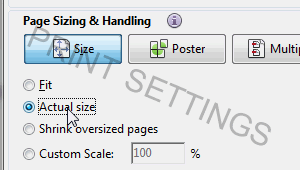
Print at actual size
Choose Actual size or 100% scale in your print dialog. Avoid “Fit to page” to keep your cover at the correct dimensions.
Enable the print border for an easy cutting guide, then trim your cover and slide it into your case.
Donations
You can use this DVD cover printer free of charge, donations are always welcome!!
For questions or suggestions, please use our feed-back form.
Search Engine Submission - AddMe